This is another old post from my old blog that was seasonal that I wanted to share here.
One of the challenges on the MTC forum Christmas Challenges (back in 2010) was to create some gift card holders. Well, I had quite a few different gift card holders already on my old blog at that time. However, when I started looking, it didn't look like I had any or very few using MTC so I decided to take on that Challenge.
The Challenge was to make 3 different gift card holders. I did the traditonal standby Christmas Stocking, a "gift bag" that I turned into a "santa bag" and a simple tri-fold gift card holder. The "bag" or "Santa belly bag" can be used as a simple shopping bag. It is also big enough to hold the bigger Itunes gift cards - especially if you use something like the fur that I used at the top of the bag. I shared the files I created on the MTC forums before Christmas 2010 so, if you are a member there, you may have already downloaded my files. If you aren't a member or were not back then you may not have gotten these files so I am putting them here for your use.
They are .mtc files only as I haven't converted them into any other format. So little time and so much to do!! LOL Hopefully, someone can find a use for some of them. As always, I would love to see what you do with them should you choose to use them for a gift! Thanks for stopping by!!
If you have a 4shared account than you can access the original files I shared here:
You can download the Stocking Gift card holder here.
You can download the Santa Belly Bag gift card holder here.
You can download the tri-fold gift card holder here.
If you don't have a 4shared account, I have now uploaded them to my dropbox account and you can download them from there right here:
You can download the Stocking Gift card holder from dropbox here.
You can download the Santa Belly Bag gift card holder from dropbox here.
You can download the tri-fold-gift card holder from dropbox here.
As always, thanks for stopping by. I would love to see anything that you create with my files.
Welcome!
Welcome to my New Blog. This blog is for sharing my crafting ideas and my cutting files that I create primarily using the Make the Cut Software and my electronic cutters which include my 18" Black Cat Cougar, a Silhouette SD, and an original Expression.
All files and information shared here is for your personal use only. Please contact me if you wish to use any items commercially, for blog contests, or to submit for magazine publication. Thank you.
Showing posts with label Make the Cut. Show all posts
Wednesday, November 21, 2012
Thursday, June 14, 2012
Manly Card - Vest for Dad - .svg and .mtc files
******Another timely, but old post from my old blog. A vest card for that last minute Father's Day card you might need to make! (I actually meant to repost this in time for Father's Day cards but forgot about it until now. Don't forget Father's Day is this Sunday, just 4 days away!!!!**********
Hello. I was looking back through my huge stack of "ideas" and ran across a project that I had been working on a while back. I decided to finish it up and put it out here to share with the blogging world. I found the original pattern in a February 2008 edition of Paper Crafts magazine (page 60) entitled Vest Card. You can find the magazine's website at http://www.papercraftsmag.com/index.html. (Unfortunately, the website no longer goes back to that edition!) The article notes that the design was courtesy of Tinkering Ink & Mainly Stamps. I believe Tinkering Ink's website address is: http://www.tinkeringink.com/ (but I didn't find anything there related to this Vest Card.) I have seen other "vest" cards in the past, but this is where I got my pattern from.
First, I copied and cut out the pattern provided in the magazine. I then enlarged it and scanned it to make my cutting file(s).
There really aren't any "directions" to provide. Once you cut out the card from a patterned cardstock, you simply fold the card at the middle of the arm holes so that the points of the bottom of the vest line up. The "flat" side of the vest (as opposed to the pointed side) is the outside overlapping flap. The .svg file does not have the "pocket" and the "hankie". I hand created those and imported them directly into MTC from the scanner. Glue the "hankie" to the backside of the "pocket" and then glue the pocket onto the front left side of the Vest. You can then create "buttons" or add real buttons to the right front side of the Vest. I created buttons with a small hole punch and glued them onto the card front. Then used a marker to make button holes.
Note these original downloads are from my 4shared account. 4shared now requires a free membership to download from their site. So feel free to download from there if you have an account. If no 4shared account then see download option below.
4Shared Account Users - You can download the Vest Card .svg file here. You can download the Vest Card .mtc file here. The MTC file is sized correctly and has the pocket and the hankie cuts as well. As always, let me know if you have any problems with any of my files and I would love to see what you create with any of them! Thanks for stopping by. (Note these original downloads are from my 4shared account. 4shared now requires a free membership to download from their site. So feel free to download from there if you have an account.)
No 4shared Account? If you do not have a 4shared account and don't wish to create one, I have reloaded these files to my public dropbox account and you can download them from there here. Note: You may need to do a right click and save, save as, save target as in order to save the files to your computer depending upon what browser you are using. I have tested the files and the links and all appear to be working correctly.
Download the Vest Card .svg file here or download the Vest Card .mtc file here.
As always, thanks for stopping by. I hope to have some other new files and pics posted for some neat projects in the next few days so be sure to stop back by! Don't forget to show me what you create!
Hello. I was looking back through my huge stack of "ideas" and ran across a project that I had been working on a while back. I decided to finish it up and put it out here to share with the blogging world. I found the original pattern in a February 2008 edition of Paper Crafts magazine (page 60) entitled Vest Card. You can find the magazine's website at http://www.papercraftsmag.com/index.html. (Unfortunately, the website no longer goes back to that edition!) The article notes that the design was courtesy of Tinkering Ink & Mainly Stamps. I believe Tinkering Ink's website address is: http://www.tinkeringink.com/ (but I didn't find anything there related to this Vest Card.) I have seen other "vest" cards in the past, but this is where I got my pattern from.
First, I copied and cut out the pattern provided in the magazine. I then enlarged it and scanned it to make my cutting file(s).
There really aren't any "directions" to provide. Once you cut out the card from a patterned cardstock, you simply fold the card at the middle of the arm holes so that the points of the bottom of the vest line up. The "flat" side of the vest (as opposed to the pointed side) is the outside overlapping flap. The .svg file does not have the "pocket" and the "hankie". I hand created those and imported them directly into MTC from the scanner. Glue the "hankie" to the backside of the "pocket" and then glue the pocket onto the front left side of the Vest. You can then create "buttons" or add real buttons to the right front side of the Vest. I created buttons with a small hole punch and glued them onto the card front. Then used a marker to make button holes.
Note these original downloads are from my 4shared account. 4shared now requires a free membership to download from their site. So feel free to download from there if you have an account. If no 4shared account then see download option below.
4Shared Account Users - You can download the Vest Card .svg file here. You can download the Vest Card .mtc file here. The MTC file is sized correctly and has the pocket and the hankie cuts as well. As always, let me know if you have any problems with any of my files and I would love to see what you create with any of them! Thanks for stopping by. (Note these original downloads are from my 4shared account. 4shared now requires a free membership to download from their site. So feel free to download from there if you have an account.)
No 4shared Account? If you do not have a 4shared account and don't wish to create one, I have reloaded these files to my public dropbox account and you can download them from there here. Note: You may need to do a right click and save, save as, save target as in order to save the files to your computer depending upon what browser you are using. I have tested the files and the links and all appear to be working correctly.
Download the Vest Card .svg file here or download the Vest Card .mtc file here.
As always, thanks for stopping by. I hope to have some other new files and pics posted for some neat projects in the next few days so be sure to stop back by! Don't forget to show me what you create!
Thursday, April 12, 2012
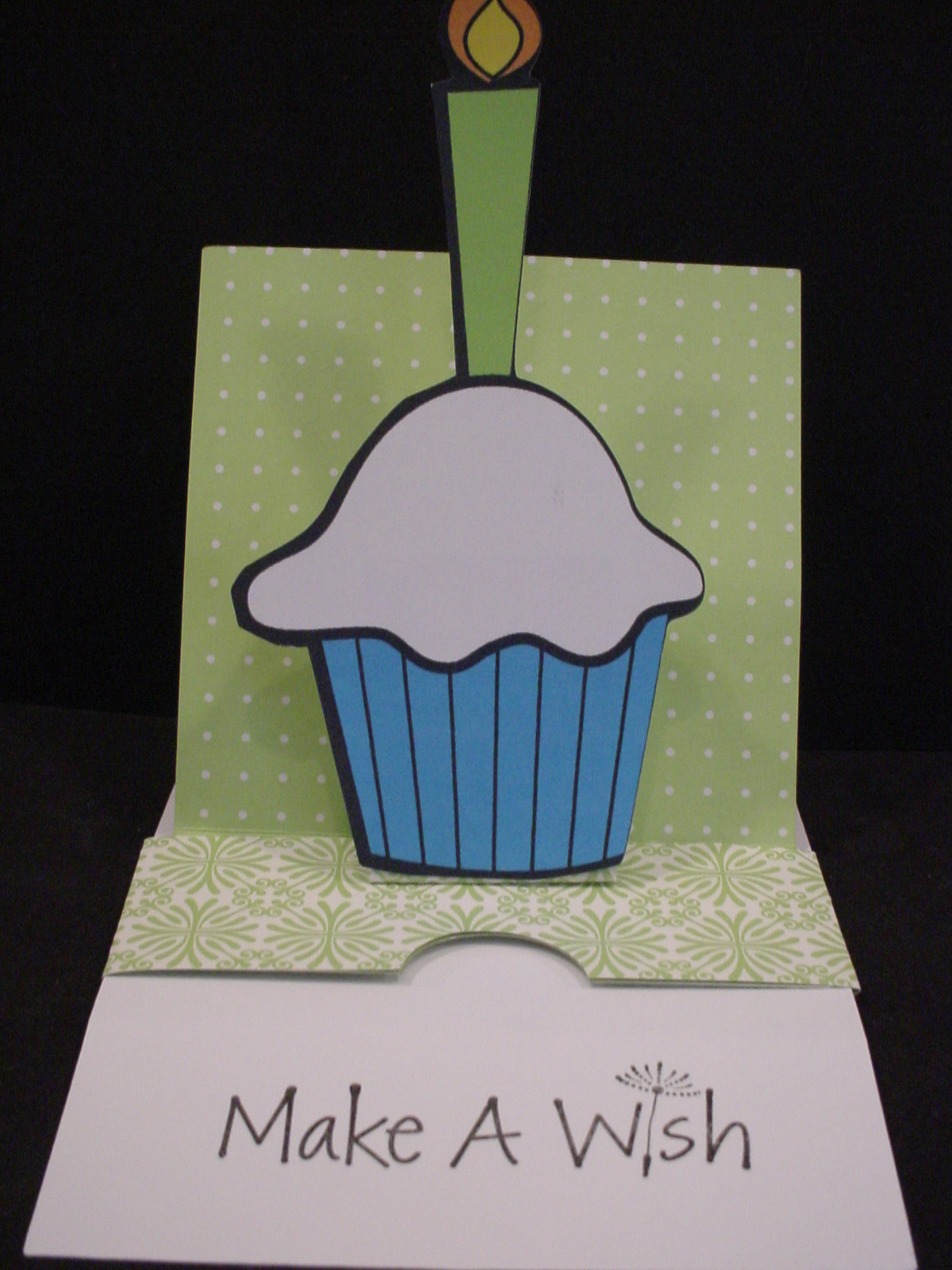
Sliding Pop-Up Card MTC File to Share
| This is picture of card closed as first seen. |
They are fairly simple "pieces" to cut and score manually so some might wonder why I would create a "cut file" for something like this. Well first, I am manual paper cutter and ruler challenged! LOL I cannot seem to get a "straight line" for the life of me. Plus, I hate having to have to "measure" all the time. By creating this cut file, I don't have to worry about cutting the edge straight or measuring off for the score lines each time I want to create this card. I just lay my paper on the mat, press a few buttons, and I'm ready to start assembling! There are several "notes" in the cutting file so be sure to read those, especially regarding how to use score lines in the file if you are unfamiliar with that.
| This is picture of card opened and showing message. |
Make sure that you read Kim's directions throughly before starting to assemble. I would also recommend creating a "mock-up" first from some inexpensive paper before using any good paper that you only have 1 sheet of! Watching the video would probably be a good idea too! It's not really that complicated once you get it all figured out. Good luck and let us see what you create with the file! Please note, the file does not include the cupcake with the candle.
As always, thanks for stopping by! DD's Travel VB will be ending soon and I hope to be able to maybe start to create and share some more files here on my blog sooner rather than later!
If you have a 4shared account you can download the MTC cutting file here Sliding Pop-Up Card. If you don't have a 4shared account, you can signup to get one for free and then download the file. This appears to be a change in their Terms of Use, you didn't need to have your own account in the past in order to download my files. I am exploring other options for sharing my files since I don't want people to have to have a 4shared account just to get my files. However, since I don't charge for my files and I don't have ads or anything on my blog to make $$ I need to find a simple and free option to do so. Stay tuned and I will update as soon as I figure something out! I have only shared a MTC file here since that is how I created my file and it is really fairly simple file to recreate from Kim's directions if you prefer another format.
UPDATE: I have also shared the file in a dropbox account. You can find the Sliding Pop-Up Card there as well. It should download directly to your computer.
Labels:
.mtc,
Birthday,
card,
cupcake,
Make the Cut,
pop-up card
Thursday, March 22, 2012
When looking for the football outline for the T-shirt to share, I ran across this football shaped card that I had also made last Fall but had never shared the cut file for. I originally made the card to give to my son to celebrate scoring his first Varsity Touchdown! He is just a freshman so that was a really big deal! PLUS, it was even bigger because neither myself nor my husband was there to see it! : ( In our defense, our school has to travel alot for our games and both DD and DS had games that night (she plays Volleyball). He was 2-3 hours away and she was at home. As a Freshman, he indicated that he probably would not get into that game so no need for one of us to come! Alas, not true!! We were winning by a good margin already and they put him in towards the end of the game and he scored! I was so happy and yet so sad! I did get to see it on the "Web" as we broadcast our games that way! Anyway, I knew I needed to make him a card to celebrate and let him know we were sorry we missed it and we proud of his hard work and effort that gave him the opportunity to play.
There are several layers to the card. There is a black base and then there are two white layers in the file. I think I just went with the one with the 3 pieces cut rather than the solid white base. I used the swiss dots embossing folder to add the texture and then used some ink to "rough" it up and make it look like a well used football.
You can download the .mtc (Make the Cut) Football Shaped Card here.
There are several layers to the card. There is a black base and then there are two white layers in the file. I think I just went with the one with the 3 pieces cut rather than the solid white base. I used the swiss dots embossing folder to add the texture and then used some ink to "rough" it up and make it look like a well used football.
You can download the .mtc (Make the Cut) Football Shaped Card here.
Wednesday, March 21, 2012
Football Shirt Design
I had previously shared a picture of this football shirt that I made but realized that I had never shared the file when someone recently asked on the MTC forum for a "football outline" for making shirts and I was going to point them to my blog to get this one and when I came to get the link realized that I had not yet shared the file! So, even though its not presently football season, I wanted to get this file up so I could share it with that person looking for one! There are two layers, a white layer and then a dark green layer that goes on top.
Please note. It has my children's school logo in the middle (we are Spartans) - just delete and replace with logo of your choice. It is also "mirrored" already for cutting with HTV and placement onto a T-shirt. If you don't need to cut and mirror just flip or unmirror it.
You can download the Football Outline for T-shirt here.
Please note. It has my children's school logo in the middle (we are Spartans) - just delete and replace with logo of your choice. It is also "mirrored" already for cutting with HTV and placement onto a T-shirt. If you don't need to cut and mirror just flip or unmirror it.
You can download the Football Outline for T-shirt here.
Tuesday, March 20, 2012
Crab, Palm Trees, Waves, and Umbrella for the Beach
Hey everybody. Been extremely busy and hadn't gotten back recently to share any files that I have created but not shared (no time to create right now it seems either!). I happened to run across this file while "cleaning up" and remembered that I had never shared the file. Looks like I made it a while ago! It was from a free pattern I had found. It contains two palm trees with coconuts, the crab and the umbrella. The sun is simply a small circle and the sand is torn kraft paper that I used the swiss dots embossing folder on and inked the edges and the "dots" to give it texture. I used a "texture" ink pen on the wave tips.
You can download the Make the Cut file from my 4shared account here. (I use 4shared as it is free and easy to deal with). Download the Crab, Palm Trees, Umbrella File here.
Labels:
.mtc,
Beach,
beach umbrella,
card,
coconut,
crab,
Make the Cut,
pam tree
Friday, March 9, 2012
Bunny Card
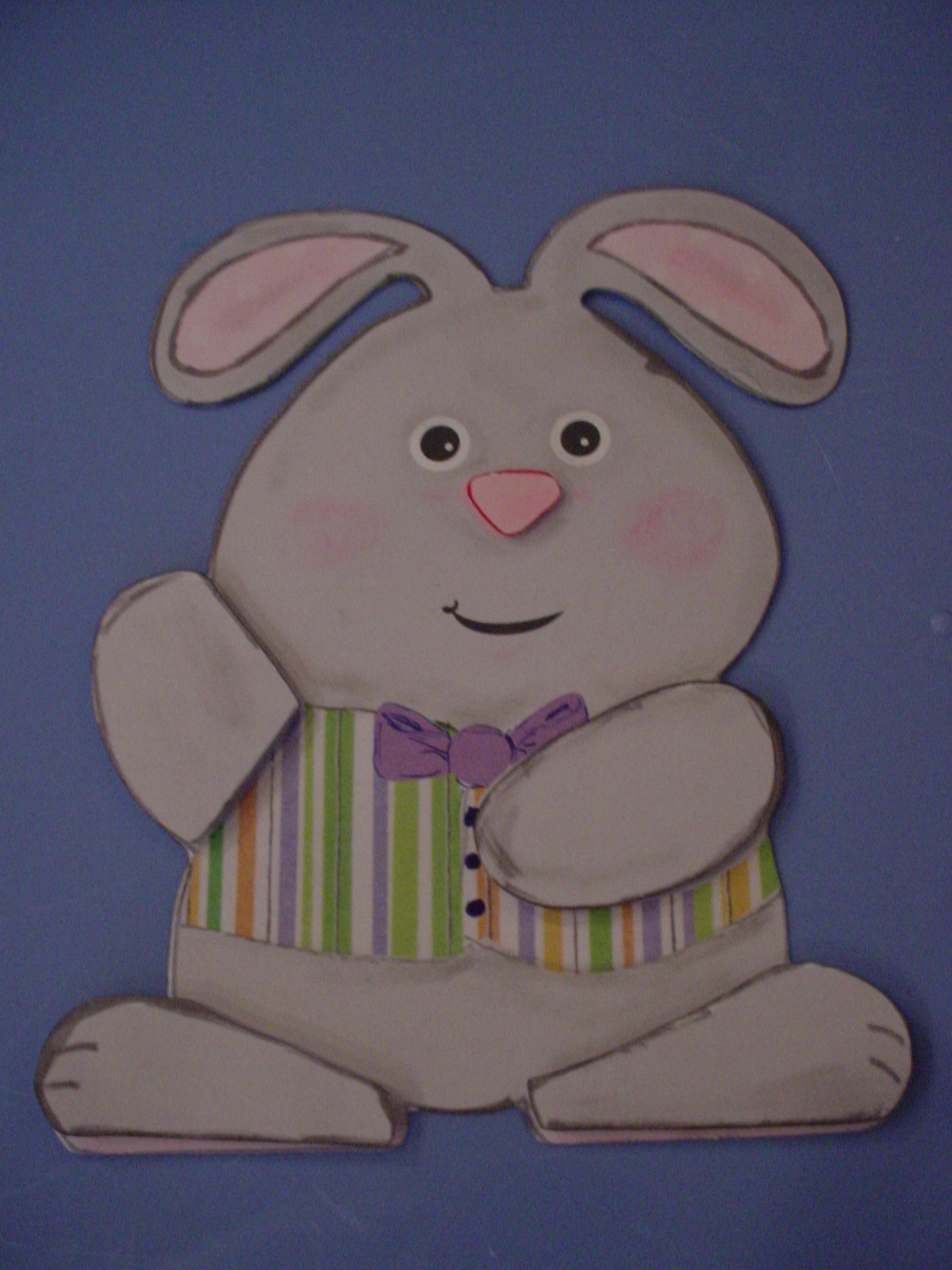
Continuing on with old posts from my old blog. I needed to show you this one before I share a file I created to be similar to this one tomorrow! This card is from the Spring, 2011, Issue 28 of the Paper Creations magazine. In the magazine, on page 22 there was an article entitled, "Bunny Card" which was designed by Maricel Fabi. It was this really cute Bunny Card for which they provided a pattern pullout to trace and cut by hand. Now, anybody who knows me knows that I HATE to cut with scissors. (I think this is because I am left handed and, when I was little, all scissors were made for right handed people. It wasn't until "modern times" that they made left handed scissors or ones that didn't matter which hand you used! LOL You won't understand what a problem this is UNLESS you are left handed OR you are right handed and have tried to cut using left handed scissors!! LOL) This is what I got my electronic die cut machine and my Make The Cut software for!!!!
| This is the "Print and Cut" Bunny |
Then I thought - well hmmmmmmm. . . . . . . I think he would be really cute if I made him into a "Print and Cut" file - I bet that I could do that really easy. So I created a pink polka dot texture that I added to the "inner ear" parts I had created and a multi-colored striped texture that I added to his vest. I found paper I had in my stash to get these "textures" from and scanned them into my computer and made texture files from them. I then created a "full bow tie" with basic shapes and added a purple color to it. I then made his body gray and added his mouth and his eyes to my MTC file so that they would "print". I then printed the bunny out on my printer (I also added separate feet and hands to "pop" dot to give it some added dimension) and then cut him and the extra pieces with my Cougar (I could also have cut him with my Expression but the Cougar was the one plugged in!). I then used Marker to ink the edges to give it some more dimension and chalked his cheeks. Otherwise, its all printed! IF I had a bigger printer (One that would print 12x12 say) I could have printed him out as a card. Since I just have a regular 8 1/2 x 11 printer I printed just the single bunny. HOWEVER, he could be glued on to the top of a card base. He can also be resized easily.
Since the file I created was from a pattern in a magazine, I can't share it with you here even though I would like to. HOWEVER, I wanted to share all of this information with you to show you what YOU can do with a pattern, your die cut machine, your printer and scanner and Make The Cut software and a little imagination! Just IMAGINE!!! LOL
As always, thanks for stopping by. Please let me know if you have any questions on how I did any of this or if I can help you out with anything. You can checkout the magazine's website here: http://www.papercreationsmag.com/. There you can see some of what is in their current issue, back issues and free projects and ideas. I am not affiliated with the magazine at all but like to give full contact information when I use something from a source. Thanks.
Labels:
bunny,
card,
Make the Cut,
Print and Cut,
Spring,
texture
Wednesday, February 15, 2012
Making my own "skin" for my Kndle Touch using Make the Cut and Printable Vinyl
I had never used this vinyl so I wanted to give it a try. They also sell a clear laminate to put over the top of it to help preserve it. It is tricky to do - tried one really messed it up! LOL So, this one does not have it on there! Probably would be best to use it though if you are using it for something like this. I would apply it before I did the actually cutting.
Once I had the template created, I created new layers to create the "print and cut" elements that I wanted to print on my "skin" (The print and cut elements I used ARE NOT included in my MTC cutting file I am providing below even though they were free images I found by doing a google search online for images of Mickey.) I used MTC's text element to create the text that I put on the front left side using a free "Minnie Font" I have on my computer. I then used "pixel trace" and "texturizing" to pull in the two other picture elements that I wanted to include (the small mickey on the front and the magazine cover on the back). Due to the way that I have my "skin" template laid out on the mat (so that I could get both out of 1 8 1/2 piece of viny) I had to rotate those images outside MTC before I pulled them in so that I could then resize them as needed. If I had not done that, I would not have been able to rotate them inside MTC and also been able to keep and rotate the texture too.
I first cut out a sample template out of plain regular removeable wall vinyl to make sure my template fit. (This is the purple template you see). Once I knew my template worked, I then did the print out of my template with my images with registration marks from Make the Cut and then I used my cutter to "cut it out". I then simply adhered my vinyl skin to my Kindle Touch and I have my own skin I created myself! How cool is that!
Note: Be careful when working with this so that you don't accidentially move any of the elements or accidentially resize them. I do no lock my "layers" on my files but you may want to do so to ensure no accidential resizing or moving while working on your project.
If you have a Kindle Touch and Make the Cut and would like to make your own "skin" for it then you can download my Make the Cut file here: MTC Kindle Touch Template.
For various reasons that I won't get into right now, for now at least, I will only be sharing this template in the Make the Cut format. I may, at a later date decide to share it as an svg file but I am not doing so right now. I hope you will understand. Please feel free to leave me a comment if you are interested in it in that format so I know to reconsider. Also leave me a comment if you have any questions. I did leave some "detailed" notes and photos of my project in the Notes area of MTC.
As always, thanks for stopping by. I hope to see some projects using this skin soon!
Friday, February 3, 2012
Treasures of the Sea
I have previously posted about getting patterns to cut from Scroll Saw magazines and websites that you can use to create cut files for use with your cutters. Obviously, to do this you would need to have a 3rd party software like Make the Cut (MTC) or Sure Cuts a Lot (SCAL) or another program that lets you bring in your own designs. So I always take a quick look at scrollsaw magazines whenever I see them to see if there are patterns I would like to use to make a cut file. As a result, I quickly purchased a news stand copy of Issue 39, Summer 2010 ScrollSaw Woodworking & Crafts magazine when I saw these "Treasures of the Sea" items. Interestingly, it wasn't until after I bought the magazine and had created the .mtc cut files that I actually read the full article and saw where it noted that these patterns were orignally designed as paper cuttings and that many paper cutting patterns are easily cut on a scroll saw! LOL
The website for ScrollSaw Woodworking & Crafts magazine is http://www.scrollsawer.com/. This site has lots of information including various patterns you can download directly from their website. Many of them can easily be used to create and cut with paper on your electronic cutters.
The particular article that drew my attention in the Summer 2010 edition was entitled Treasures of the Sea. The article and the patterns used were created by Gloria Cosgrove (the actual cuts shown were done by Linda Heigerson.) Gloria and her daughter, Alison, specialize in "scherenschnitte" (paper cutting) patterns. These patterns would have originally been designed to be cut by hand. They have a mail-order business selling original art work and paper cutting patterns. Their website can be found by visiting http://www.papercuttingsbyallison.com/. Be sure to check it out for some beautiful artwork that coud be made into files to cut with an electronic cutter that can use software like MTC or SCAL.
For these items, there were 6 patterns provided for different seashells and a sea horse in the magazine. I took the patterns and scanned them into my computer and used Make The Cut (MTC) to create cut files to cut.t. As you can see, there is a lot of delicate detail in the cuts. However, they pulled in quite well into MTC. I did end up pulling a couple of them over into Inkscape to do some node modifications in a few spots. They cut just fine with MTC. I used the items I cut to make cards. I think the cards could be used for a variety of needs such as sympathy, thanks, or any other need. They could also be used to create home decor items like framed art (this is what they were in the scroll saw magazine for) or even vinyl on a wall or used on a scrapbook page.
I really would love to share these files with you BUT unfortunately I don't think that I can! Since the patterns appear in the Scroll Saw Woodworking & Crafts magazine, it indicates that the copyright belongs to them. The pattern pullout sheet then indicates that you can make up to 10 copies for personal use "for the buyer of the magazine". However, I hope by posting them here for you to see, that you will also see that there are other places to look for patterns and ideas of items to cut with your electronic cutters. In addition, scroll sawers may see a new way to get their patterns ready to adhere to their wood to cut with. Thanks for stopping by!Thursday, February 2, 2012
Sharks
Rather then giving them to my friend and then leave them languishing on my computer, I figured I would share them here in hopes that someone else could find them useful. If you do find a use for them I would love to see what you do with them. They could be used to create a page about sharks, a shark exhibit, a trip to an aquarium, the beach ummm . . . not sure I want to see any at the beach myself however! LOL
Download the Make the Cut Sharks Logo with 2 Layers here.
Download the Make the Cut Sharks Logo with 3 Layers here.
OR, you can download the .svg files if you don't have MTC. I also have this file type available because this is what my friend needed. I created the orginal files using the Make The Cut software and then did a simple export of the files to save them as .svg files to share with my friend.
Download the .svg Sharks Logo with 2 Layers here
Download the .svg Sharks Logo with 3 Layers here.
As always, thanks for stopping by. If you ever need help creating a file, leave me a comment and I would be happy to try and help out if and when I can. It may be a few days before I respond however as I don't always get a chance to check my blog for comments on a daily basis. Thanks for understanding.
Wednesday, February 1, 2012
Volleyball or Sports Photo Frame Overlay
Another older post from my old blog but something I thought was worth sharing again here.
Sorry, but there is no actual cut file to share with you today as it is something that I created that was very "specific" to a small group of girls. However, I wanted to show you what you can do for those special people in your lives when you have an electronic die cut machine with an awesome program like Make The Cut.
My children both play sports. my DD's high school varsity volleyball team won our Regional Championship and qualified to go to the State Tournament in their division back in 2010 . (This was the 2nd year in a row, but she wasn't on the team last year as she is a Freshman this year.) For Christmas that year, I made her a framed photo of the group with the Regional Championship Plaque. I created this mat or overlay to frame the photo with. It cuts as one piece with the wording and the spartan heads all cut out of the Mat. My DD loved it.
I got the idea from Julie and her awesome tutorials that she creates and shares for free on the MTC_Tuts Yahoo group. If you have MTC and don't belong to Julie's MTC_Tuts Yahoo group I would highly recommend joining. If you don't have MTC yet but are thinking about getting it, I would also highly recommend Julie's Yahoo group as well. It is a moderated group and Julie does a great job of keeping people on task and shares a wealth of knowledge and information in the large quantity of FREE tutorials that she shares with the group. In addition, lots of people regularly share their knowledge and experience in using this great program. If you buy MTC through Julie's link she will also send you some free files. (You don't have to have purchased MTC through Julie to join the group however and other people also share free files if you purchase through them. No matter who or where you purchase MTC from - it should always be the same price). The group just recently added its 3,000+ member and Julie shared some Irish cut files. It is a great place for newbies and not so newbies to keep expanding their knowledge of the program. Julie has a ton of tutorials for beginners to advanced users and that list is growing regularly. There is a lot of email that passes through the group so I have it on digest so that I get just a few emails a day with a compilation of messages that have passed through the group. You can also set it to receive no emails and just go to the yahoo group to view the messages and tutorials.
You can find Julie's MTC_Tuts Yahoo group here: http://groups.yahoo.com/group/MTC_Tuts/
(She will have to approve you for membership but that shouldn't take long).
If you are a member, or once you join, you can find the tutorial on how to create a Sports Frame Overlay like this one here in the Intermediate Lessons Folder and it is entitled: III.12_SportsFrameOverlay.
As always, thanks for stopping by. Please feel free to leave me any questions or comments by clicking on the comments area below any post.
Thursday, January 19, 2012
Banana for Sock Monkey
Here is a Banana for the sock monkey.Wouldn't want him sitting around hungry! It has 3 layers to it.
You can download the banana in .svg format here.
Please let us see what you do with these files. It's so much fun to see someone actually put your work into a project! Thanks for stopping by!
Wednesday, January 18, 2012
Sock Monkey
This file is one of a Sock Monkey. I found the image from a free coloring book page. I had previously shared him on my old blog so you may have him already, if not and you want itYou can download my sock monkey file for MTC here.
You can download the Sock Monkey in .svg format here.
As always, this file is for personal use only. Please let me see what you do with this file if you do use it. Leave me a comment f you have any questions or problems with this or any of my other files.
Tuesday, January 3, 2012
Everything's Better with Friends! Card using Print and Cut with MTC
Hello. Thanks for stopping by. I'm going to be trying to add some "new" stuff as I continue to also bring over some of my "older" stuff from my old blog. So some days you will see multiple posts (I hope!) This is one of those days! No file to share (just a site to get it from) but some ideas as to how to make them your "own".
Our weather finally turned to winter weather (well winter COLD weather - no snow!) the past couple of days which made me think of some cute snowmen files I purchased from Scrappydew.com's website back in November. I used one of the snowmen from Scrappy's Snowman Set II found in the Christmas Palz I collection. You get 3 different snowmen with all their parts and pieces for a whopping $1.99 (US funds). PLUS, you get them in a variety of different formats too! (This particular set comes in MTC-SVG-PDF-DXF formats). This card is only using 1 snowman from that set. (I hope to use some more soon!)
Well, I wanted to make a card BUT I didn't want to do a lot of paper piecing right then. So I figured I would do the snowman as a "print and cut" instead of paper piecing him together.
Our weather finally turned to winter weather (well winter COLD weather - no snow!) the past couple of days which made me think of some cute snowmen files I purchased from Scrappydew.com's website back in November. I used one of the snowmen from Scrappy's Snowman Set II found in the Christmas Palz I collection. You get 3 different snowmen with all their parts and pieces for a whopping $1.99 (US funds). PLUS, you get them in a variety of different formats too! (This particular set comes in MTC-SVG-PDF-DXF formats). This card is only using 1 snowman from that set. (I hope to use some more soon!)
Well, I wanted to make a card BUT I didn't want to do a lot of paper piecing right then. So I figured I would do the snowman as a "print and cut" instead of paper piecing him together.
Now, one of the neat things about ScrappyDew's MTC files is that they make it really easy to use the files as either paper piecings or as a "print and cut" as they have all the "pieces" layed out on their own layers PLUS they have a "cut layer" or "shadow layer" already made and ready for making one cut just around the outside edge of the image!
But, if you look carefully at the snowmen on my card you will notice that the snowmen all have different color scarves and hat bands AND the snowman in the middle has his scarf and hat going the opposite direction from the other two snowmen! The first snowman, the one with the blue scarf and hat, is the original snowman as received from ScrappyDew (reduced in size though to fit 3 on the card front). However, I thought I'd like to make each snowmen have different colors hats and scarves. Make the Cut (MTC) makes that really easy to do. I simply selected the items that I wanted to change the color on and changed it to a new color! (There are several ways to do this - you can change on the layer, you can do ctrl, shift, U and it will take you to the color selection area or you can select the item so that it has the selection box around it, then right click and go to the change, color, texture, line and go to change color.) I coud have also added a "texture" (like a stripe or star pattern) if I wanted and had them on my computer (say from a Lettering Delights texture file!) or wanted to take the time to create them. This would be done by going to the change -->texture choice.
Now, the other thing you should notice is that the scarf and hat on the snowman in the middle is also going in the opposite direction then those on the other two snowman! His scarf is blowing to the left while the other two's are going to the right. His hat is leaning towards the right while the other two's are leaning to the left. This is also very simple to do in MTC! I simply selected all the layers of that snowman, right clicked, Shape Magic and mirrored him. Quite easy! The reason I selected all of his layers is because I was doing a print and cut and wanted to make sure that all the parts flipped and matched up including the solid outline for cutting purposes. If I had been doing a paper piecing, I could have just mirrored the hat and scarf themselves if I was not using the outline piece as a base to piece it all on. YOU can decided to do what ever works for you - there is no limits or being locked into what someone else "envisioned"!
Now, I'm trying to decide how to finish off this card. Can't decide if I want to add any wording to the front or leave it as is and just put inside the card. Thinking about "Warm Winter Wishes", "Good Friends are often Flakes", Some of my Best Friends are Flakes", or "Let it Snow, Let it Snow, Let it Snow". Anybody got any good ideas?
The background is a stamp from Hero Arts that I got on sale before the holidays at Michael's. It's title is "Stunning Snowflakes". I used a Tsukineko Brillance Moonlight White inkpad to stamp it with. I used some Martha Stewart fine crystal white glitter on the snowmounds (doesn't show up well in the picture) and some minor inking/doodling on the snowmen. I then pop dotted the two front snowmen.
Thanks for stopping by. I hope this helps you to see how you can take those purchased and/or free files that you have and make them your "own" simply by changing their colors and/or direction! Please feel free to leave me a comment below. Be sure to stop by ScrappyDew's to find lots of winter friends to work with. I hope to show you some more of them soon as I bought quite a few back in November and one of my New Year's resolution was to start using some of those files and ideas I have laying around!
Subscribe to:
Posts (Atom)